

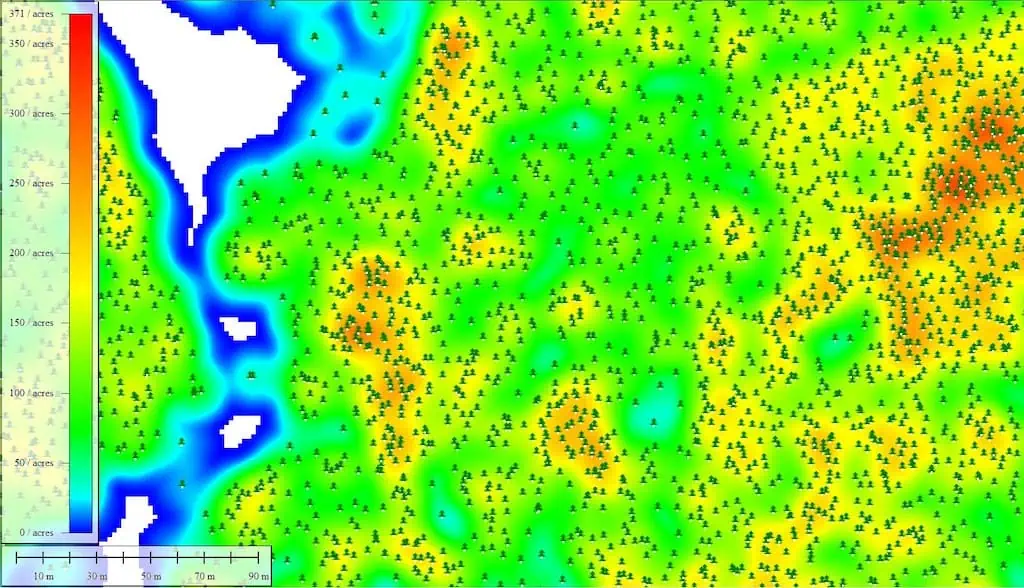
Evaluating forest density accurately is essential for tracking ecosystem vitality,managing natural resources,and reducing wildfire hazards. While conventional field surveys can be time-consuming, innovations in remote sensing, especially lidar technology, present a more streamlined solution. discover more >>
by harnessing lidar’s capability to penetrate tree canopies, researchers can create intricate density maps that illustrate both vegetation coverage and the underlying ground features.
Lidar data plays a pivotal role in categorizing forest structures, enabling precise assessments of tree spacing, canopy dimensions, and overall biomass distribution. Although Blue Marble Geographics’ Global Mapper Pro accommodates both photogrammetric and standard lidar point clouds, this discussion emphasizes traditional lidar due to its enhanced ability to penetrate canopies.
While forest density maps are frequently enough utilized to analyze the spacing of individual trees, further insights can be derived by examining clusters based on characteristics such as height and canopy breadth. The software’s draw Lidar by Point Density feature provides a comprehensive view, illustrating vegetation density without focusing on individual trees—an effective method for evaluating ground cover.
To create a forest density map using lidar in Global Mapper Pro, follow this organized three-step approach:
- Classify the Point Cloud: differentiate between ground, vegetation, and other classifications to isolate pertinent data.
- Extract Individual Trees: Employ the Automatic Extraction tool to create a point feature for each identified tree.
- Generate a Density Grid: Use the Density Grid tool to calculate tree density and visualize spatial distribution trends.
As lidar technology advances, its applications in forestry are set to enhance accuracy and efficiency, solidifying its status as a vital tool for environmental assessment.
explore the complete article, or visit the Blue Marble Geographics website for more facts.