

Amanda Lind from Blue marble Geographics elaborates on the methodology for categorizing transmission towers within point clouds, utilizing Global Mapper as a prime example of the segmentation toolS application.
Global Mapper Pro has introduced an innovative tool designed for the classification of power poles, streamlining the categorization of intricate electrical structures. Unlike the standard pole classification tool,which is limited to identifying cylindrical forms,this new approach allows for the classification of transmission towers. These structures possess a unique “fingerprint” composed of various characteristics that distinguish them from other points in the point cloud. The segmentation tool in Global Mapper pro effectively identifies clusters of points based on these shared attributes.
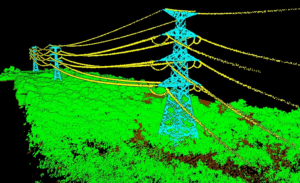
Utilizing the segmentation tool in Global Mapper Pro allows for the identification and classification of transmission towers.
Prior to classifying transmission towers, it is beneficial to first categorize noise, ground, and wire points sequentially. This initial classification aids in filtering out irrelevant points that do not pertain to the towers. after completing this step, the Filter Lidar tool can be employed to deactivate classified points, ensuring they are excluded from further processing.
Understanding Segmentation
Segmentation is a lidar classification technique that organizes points into groups, or “clusters,” based on shared attributes. The primary objective is to group similar entities; as an example, a vehicle, a tree, road markings, sidewalks, or specific grass species.Essentially, any object that exhibits a distinct “fingerprint” of attributes compared to its surroundings can be classified using the Segmentation tool.For additional insights, refer to the knowledge base.
When selecting attributes from the segmentation tool,opt for those that exhibit similarity across the entire feature. While exact matches are not necessary, the Standard Deviation setting allows for a specified range of values for recognized features. Below is an illustration of an attribute that would be unsuitable for our classification task:
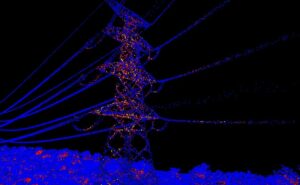
The lidar points associated with this tower display a range of return number values,indicating that this attribute should be avoided during segmentation.
Segmenting Transmission Towers
Transmission towers serve as an excellent case study for utilizing the segmentation tool, as they are generally constructed from uniform materials, resulting in consistent attributes such as color and intensity across the entire structure. This uniformity creates a recognizable fingerprint throughout the tower.The attributes necessary for segmentation can be selected from the left side of the segmentation dialog, as illustrated below.
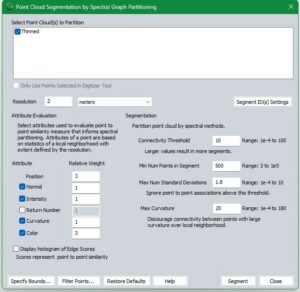
This image provides a starting point for configuring settings to segment transmission towers within Lidar data that includes color.
Configuration Considerations
Each point cloud is unique, necessitating adjustments to these settings to align with your specific data. In the example settings provided, the resolution is intentionally set higher than usual to accommodate the large, uniform structure, avoiding the emphasis on minor features. The Minimum Number of Points in Segment is kept low for the same rationale. Maximum Standard Deviations are set very low due to the minimal variation within the structure. Any point that substantially deviates from its neighbors is unlikely to belong to the tower.A high standard deviation value is typically around 3. The intensity value reflects the surface’s reflectance,indicating how strongly light bounced off the tower’s surface and returned to the sensor,which is generally material-dependent.Color is prioritized over other variables, as it aids in differentiating the tower from the similarly structured power lines. In cases where point clouds lack color, classify the power lines first, then filter them out before proceeding with segmentation. For further clarification on these settings and their applications, consult the knowledge base.
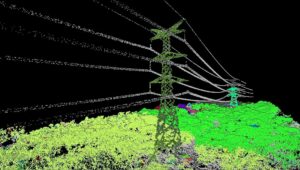
Segments are assigned random colors and may be tiled based on available computer memory during processing,as seen with the radiant green and gray tower in the background.
After segmentation, individual segments (also known as clusters or groups) can be selected and assigned a classification. Utilize the Segment Select tool to choose segments, holding down the CTRL key to select multiple segments concurrently.